This document contains the instructions for installing an eSIM on iOS and Android devices either using the QR Code or doing a manual install.
Requirements for Installing eSIM
Before you install your eSIM you’ll need to make sure you have:
- A strong WiFi, 4G or 5G connection
- An eSIM compatible device
- The device is not locked to a specific carrier.
Check Carrier Lock Status on iOS (iPhone/iPad) Devices
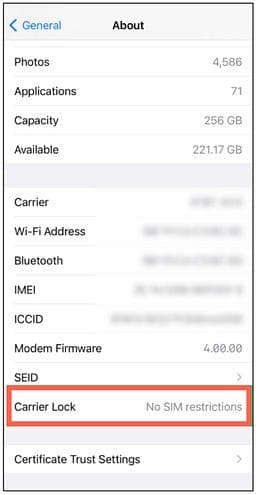
On iOS 27.0 and later, Open Settings, then select General and finally About.

If you see “No SIM Restrictions” in the Carrier Lock section, your device is unlocked.
If your device is currently locked to a specific carrier, you can contact your mobile phone provider to check if it can be unlocked.
Devices purchased directly from Apple and not through a carrier’s promotion will